Blasting out 2,843 applications in a single week netted one candidate just four interviews—and flagged their LinkedIn profile as spam. Volume without relevance rarely wins.
After months combing through user forums, Trustpilot reviews, and recent shutdown news, we found the same pattern: LoopCV’s fire-hose approach trades credibility for speed.
This guide offers two safer routes. The first automates applications while rewriting each résumé and cover letter for fit. The second helps you craft finely targeted documents in minutes. Both protect your accounts and lift reply rates.
Ready to swap scatter-gun tactics for a focused, interview-ready campaign?
How we picked the stand-out alternatives
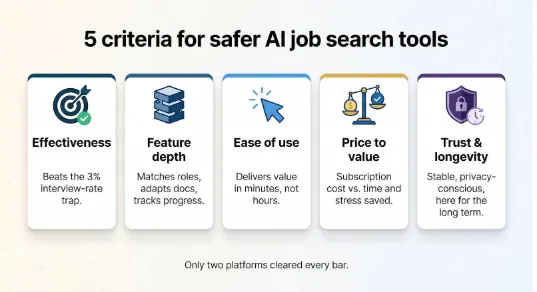
Before naming any winners, you deserve to know the yardstick we used. We began with a long list of AI job-search tools—anything that claimed to save time or lift interview rates. Then we tested each one against five non-negotiables.
First, effectiveness. We looked for clear evidence of interviews landed and callback rates that beat the three-percent trap. Marketing claims were nice; real user data mattered more.
Second, feature depth. A modern job hunt is more than clicking “Apply.” We scored tools on whether they can match roles, adapt documents, and track progress without forcing you to juggle extra apps.
Third, ease of use. If setup felt like onboarding a new CRM, we cut it. Busy professionals need minutes, not hours, to see value.
Fourth, price to value. Free tiers are great, but we weighed subscription costs against the time and stress the software removes. A higher fee passed muster only when ROI was clear.
Finally, trust and longevity. We filtered out services with shaky support, data-privacy doubts, or a recent history of shutting down on users overnight. Stability is not a luxury when your career is on the line.
Only two platforms cleared every bar. You will meet them next, each representing a different philosophy: smart full automation or precision DIY. Keep these criteria in mind; they are your GPS for choosing the right path.
1. AIApply: smart automation without the spam
Picture a virtual job-search assistant that never gets bored, never mistypes a field, and never sends the same résumé twice. That, in a nutshell, is AIApply: the best AI job automation tool. The platform pairs the speed of auto-apply with the nuance recruiters want, then layers in real-time interview coaching so you stay sharp once the callbacks start.
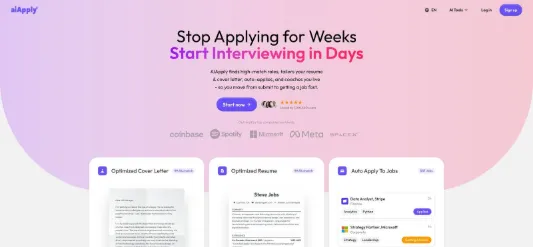
AIApply homepage screenshot showing smart automation features
What sets it apart
AIApply’s first trick is precise targeting. On its homepage, https://aiapply.co shows more than 1.1 million users already betting on that accuracy. Instead of blasting every listing, the engine scans thousands of openings and surfaces only those that match your skills and salary goals. When you approve a role, the system rewrites your résumé and cover letter on the spot, injecting keywords from the description and highlighting relevant wins. Each submission looks hand crafted because, in effect, it is, just assembled by GPT-powered logic instead of late-night copy-paste sessions.
That quality focus matters. Analyses of bulk auto-apply show generic blasts convert to interviews only two to three percent of the time, whereas customised applications jump to the 10-to-15-percent range, according to a 2024 Sprad analysis.
Live coaching in your ear
Sending stronger applications is half the battle; nailing the interview is the clincher. AIApply’s Interview Buddy streams talking points and STAR-style bullet prompts to your screen or discreetly to an earpiece while you speak. It listens locally, offers real-time guidance, and even generates an instant transcript with filler-word stats once the call ends. Think of it as an experienced friend whispering reminders about metrics and success stories just before you answer.
Day-to-day workflow
Onboarding takes about ten minutes. Upload your current résumé, tick the job-type and salary boxes, then let the engine fetch matches. You skim the shortlist, veto any outliers, and hit “Apply.” From there, AIApply handles every field, attachment, and confirmation email using your own browser session, so LinkedIn sees normal human behaviour, not a suspicious cloud bot.
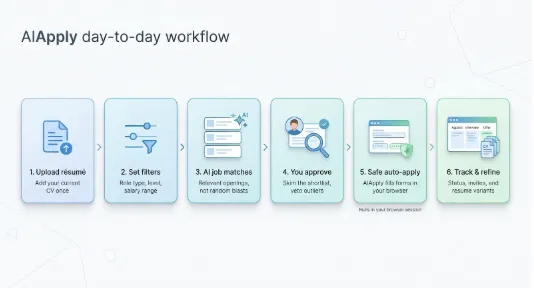
Because each résumé variant is saved, you can review exactly what went out. The dashboard tracks status changes, interview invites, and follow-up deadlines in one feed. No more hunting through inbox folders.
What it costs
Expect a base subscription of about $29 per month for the core toolkit, including Interview Buddy. Auto-apply requires separate credits or higher-tier plans starting near $74 per month, and there is no free trial for the auto-apply feature. Given that a single lost day of job hunting can cost more than a subscription, most users see it as a fair trade, especially if it replaces both a résumé builder and an interview coach.
Bottom-line benefits
- Saves hours every week without tripping anti-bot alarms.
- Delivers customised documents that pass ATS keyword filters.
- Boosts interview confidence with live, context-aware coaching.
- Lets you review and tweak every application before it ships, so control stays in your hands.
In short, AIApply offers automation for grown-ups: fast enough to keep momentum, smart enough to protect your professional reputation, and supportive enough to carry you through the final handshake. If you want the efficiency of LoopCV minus the mass-spam baggage, start your trial here first.
2. Novorésumé: precision DIY done fast
Sometimes you do not want a robot at the wheel; you just want it handing you the best tools while you drive. Novorésumé fills that role. It swaps fire-and-forget automation for a rapid-fire editor that turns one résumé into a set of precisely adjusted versions, without the late-night formatting headaches.
Why it earns a spot
Recruiters skim hundreds of documents every day. A résumé that mirrors their job description word for word stands out. Novorésumé’s built-in AI writing assistant reads the posting, then suggests bullet points, skill keywords, and opening summaries that echo the employer’s language. You stay in control, editing or deleting each suggestion, and the heavy lifting is finished in minutes.
The platform’s templates look sharp yet remain ATS-friendly. Every design stacks text in clean, left-aligned blocks, so parsing software reads it as easily as a human hiring manager. No hidden tables, no funky graphics, just clear hierarchy and subtle colour accents that nod to modern design without tripping scanners.
Adjusting at scale
Here is how a typical workflow feels. You store your original résumé and duplicate it for a new target role. Paste the job ad into the AI sidebar, hit “Suggest,” and watch relevant bullet ideas appear under each section. Accept the ones that ring true, tweak numbers for accuracy, then export. Total time: roughly ten minutes, even for a senior, two-page CV.
Next application? Duplicate again, rinse, repeat. Because Novorésumé keeps all versions in one dashboard, you can flip between them when an unexpected callback arrives, instantly recalling which achievements you highlighted.
Extras that matter
- Need a cover letter that matches the same design? One click generates a coordinated template, complete with an AI-drafted first paragraph.
- Running searches in both English and German? Premium plans unlock up to three language versions of each document, so you do not wrestle with date formats or decimal commas.
- You also get a lightweight Kanban tracker. Drag each job card from “Applied” to “Interview” to “Offer” and see your pipeline at a glance. It is not as showy as enterprise CRMs, but it keeps follow-ups and deadlines from slipping through the cracks.
Cost and value
The free tier lets you build one single-page résumé, perfect for testing the interface. Serious seekers will want Premium, which unlocks up to 10 pages, multiple versions, and the full AI assistant for roughly the cost of two coffees a month on an annual plan. Because it can cut hours of tweaking per application, most users view the upgrade as an easy investment in momentum.
The takeaway
Novorésumé is the tool for candidates who believe fewer, sharper applications beat hundreds of generic shots. Pair its AI-assisted customisation with a disciplined shortlist of roles, and you wield a precision instrument that keeps quality high, risk low, and your personal story front and centre.
Play it safe: smart rules for any AI job-search tool
Great software amplifies good strategy; it never compensates for bad habits. Follow these ground rules and your chosen tool, whether full-auto or DIY, will stay an asset, not a liability.
Keep volume human. Twenty focused applications a day already show strong intent. Send hundreds and you trigger spam alarms on LinkedIn and most corporate ATS filters, cutting response rates to the low single digits.
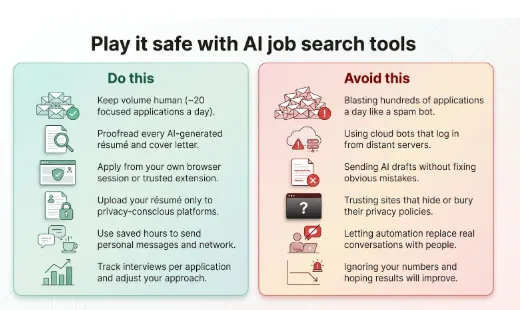
Proofread every AI draft. Auto-generated bullets or cover letters save time, but they still carry your name. Read them aloud before you hit send. One wrong company name can sink trust in seconds.
Protect your accounts. Always apply from your own browser session or a reputable local extension. Cloud bots that log in from distant servers caused trouble in 2024 when Sonara shut down after its mass-automation approach tripped ATS spam filters.
Guard your data. Upload résumés only to platforms with clear deletion options and GDPR-level policies. If a site buries its privacy page, walk away.
Use saved time to network. Automation frees hours; redirect them into personalised LinkedIn messages or quick coffee chats. Recruiter memory lasts longer than any algorithmic match.
Measure and adjust. Track interviews per application week by week. If numbers dip, refine keywords, narrow role filters, or slow the send rate. AI is a lever, but you remain the driver.
Stick to these principles and you will capture automation’s upside—speed and consistency—without falling into the costly traps that still trip up less-prepared seekers.
FAQ: straight answers to common doubts
Do auto-apply tools really increase interviews?
Yes, when they send targeted, customised applications. Mass bots average under three percent. Tools that personalise content and cap daily volume often land in the five-to-ten-percent range. Quality, not raw count, drives callbacks.
Could LinkedIn ban me for using automation?
Platforms flag patterns, not secret markers. If your tool logs in from your own IP and paces submissions like a human, risk stays low. Trouble starts when a cloud bot fires hundreds of identical applications at 2 a.m. Keep volumes reasonable and you stay safe.
Will recruiters spot an AI-written cover letter?
Only if you skip the final read-through. Modern language models write natural prose, but they still guess at details. Scan each letter, add one personal example, and keep tone consistent with your résumé. The result feels authentically you.
I’m mid-career. Aren’t these tools for entry-level churn?
Not anymore. Busy professionals use AIApply to handle form filling, then invest freed hours in networking and interview prep. Novorésumé’s multi-page support and metrics-focused bullets suit senior stories, not first-job club lists.
How do I choose between full automation and DIY?
Ask two questions. Do you trust software to pick roles for you? And do you enjoy refining résumés? If you answer “yes” and “no,” lean toward AIApply. If you want hands-on control and already have a tight target list, Novorésumé is your choice. Many candidates run both: AIApply for broad yet relevant coverage, Novorésumé for high-stakes dream roles.
Conclusion
Questions we did not cover? Add them in the comments; a real person replies each week.

I’m Leo Knox, the wordplay wizard behind WordsTwists.com where I turn everyday meanings into funny, clever, and creative twists. If you’re tired of saying things the boring way, I’ve got a better (and funnier) one for you!