
Keeping your computer clean and organized can be a real challenge. Over time, programs pile up—some you’ve intentionally installed, others bundled sneakily with different apps. Even when you uninstall them manually, they often leave behind residual files, registry entries, or scheduled tasks that clutter your system and slow performance. That’s where IObit Uninstaller 15 stands out.
The program provides a seamless solution for removing unwanted applications, stubborn Windows apps, toolbars, and plug-ins — while ensuring that no trace remains. One of its most appreciated features is Batch Uninstall, which enables users to uninstall multiple programs at once with just a single click. Combined with IObit’s deep cleanup capabilities, this tool offers a fast and efficient way to free up disk space, boost PC performance, and maintain a healthy system.
What Is IObit Uninstaller?

IObit Uninstaller is a free and powerful uninstaller that goes beyond the standard uninstallers built into Windows or macOS. It completely removes programs, browser plug-ins, and stubborn applications that refuse to uninstall normally. Available on Windows, Mac, and Android platforms, it’s designed to make the uninstallation process simple, clean, and reliable.
The software offers both a Free and Pro version, with the Pro version including advanced tools like automatic leftovers removal, software health analysis, and faster batch uninstallation. Regardless of the version, IObit Uninstaller ensures that your PC stays clutter-free and optimized.
The Power of Batch Uninstall: Mass Cleanup Made Effortless
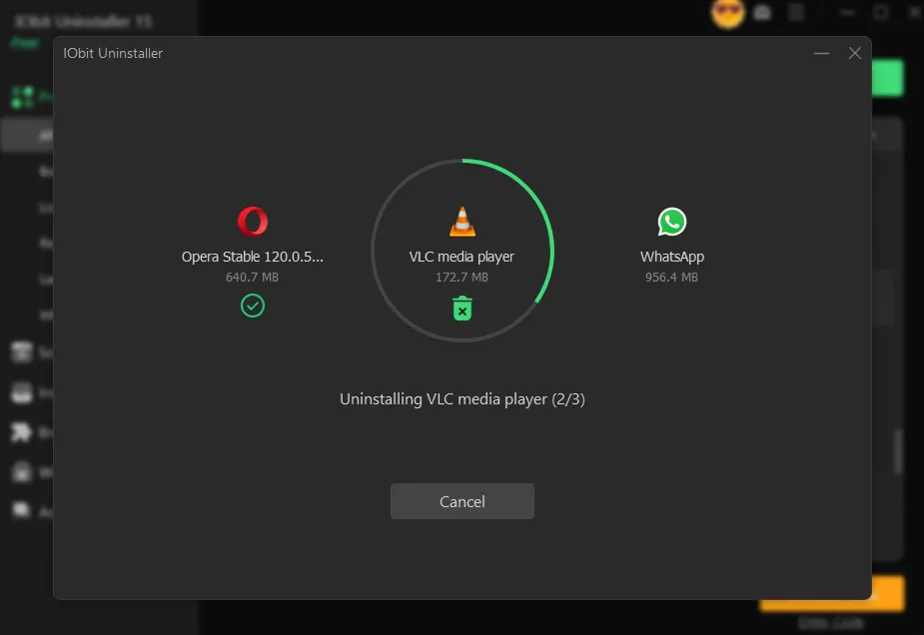
The Batch Uninstall feature is one of the most convenient and time-saving tools in IObit Uninstaller 15. Instead of uninstalling programs one by one, users can select multiple applications and remove them all at once.
1. How Batch Uninstall Works
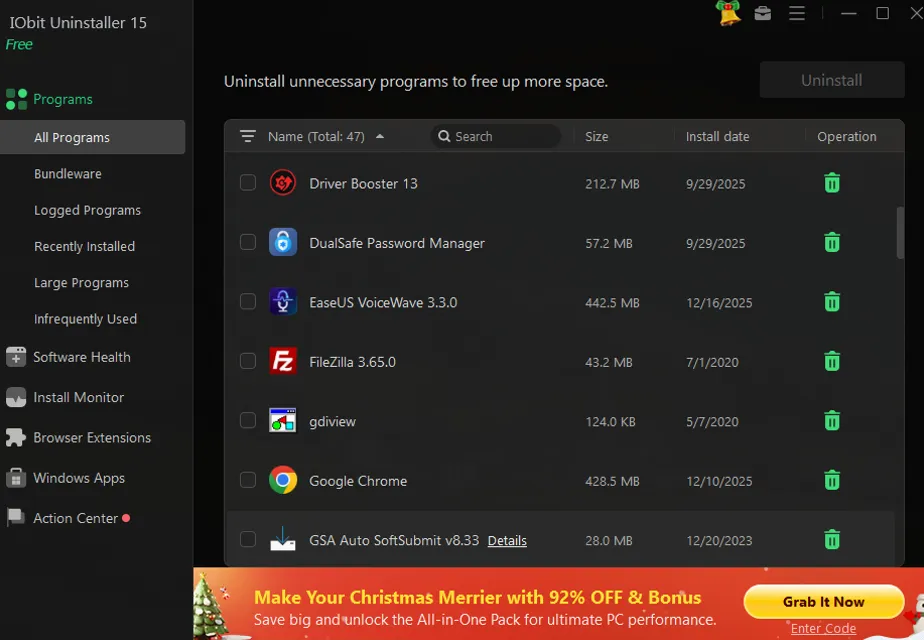
Within IObit’s clean and intuitive interface, users can browse categorized sections such as: All Programs, Recently Installed, Infrequently Used, Large Programs, and Bundleware.
From these lists, it’s easy to tick checkboxes next to unwanted programs and hit “Uninstall.” IObit Uninstaller takes care of the rest — performing each uninstallation automatically, one after another, without requiring further input.
2. Automatic Leftover Removal
After uninstalling, IObit Uninstaller 15 performs a deep scan to detect and remove any leftover files, registry entries, or folders associated with the uninstalled software. This ensures that your PC isn’t weighed down by remnants of old programs that typically accumulate in the background.
3. Batch Uninstall Benefits
- Saves time by removing multiple applications in one go
- Clears gigabytes of unnecessary data instantly
- Frees system resources and improves overall performance
- Provides a clear view of what’s taking up space
This feature is ideal for users who frequently install and test software, gamers optimizing their systems, or anyone performing a system-wide cleanup.
Silent Uninstall: Understanding the Concept
While IObit Uninstaller excels at providing an interactive uninstallation experience, it does not officially support a “silent uninstall” mode for typical consumer use.
A silent uninstall usually refers to the ability to remove programs via a command-line interface (CLI) without user interaction — for example, using commands like /S or /Q to uninstall software automatically. This feature is typically reserved for enterprise IT administrators managing multiple systems remotely, not for everyday users.
IObit’s design philosophy focuses on giving users control and visibility during the process. Its “Powerful Install” and “Force Uninstall” modes ensure that even the most stubborn or broken software can be removed safely, but these still rely on guided, visual interactions.
For everyday PC owners, this approach makes sense — it balances simplicity with security, ensuring users are aware of what’s being deleted and can create restore points if needed.
Inside IObit Uninstaller 15: Key Interface Features
The IObit Uninstaller interface is structured around usability and efficiency. The left-hand panel categorizes all uninstallable elements, allowing users to manage every aspect of their system.
- Bundleware: This section displays programs that were installed together with another main application. IObit highlights these automatically, helping users identify unnecessary bundled software that may have been added without their consent.
- Recently Installed: A convenient way to track and remove apps you’ve recently added. This is especially helpful after installing new software packages that might have brought extra programs with them.
- Large Programs: Programs that consume significant storage space appear here, making it easier to identify and remove data-heavy applications that you no longer use.
- Infrequently Used: This category helps declutter your PC by listing software you rarely open — perfect for freeing up valuable disk space.
- Toolbars & Plug-ins: Browser toolbars and extensions can slow down browsing and pose privacy risks. IObit Uninstaller 15 allows users to easily remove unwanted plug-ins from browsers like Chrome, Edge, Firefox, and Internet Explorer.
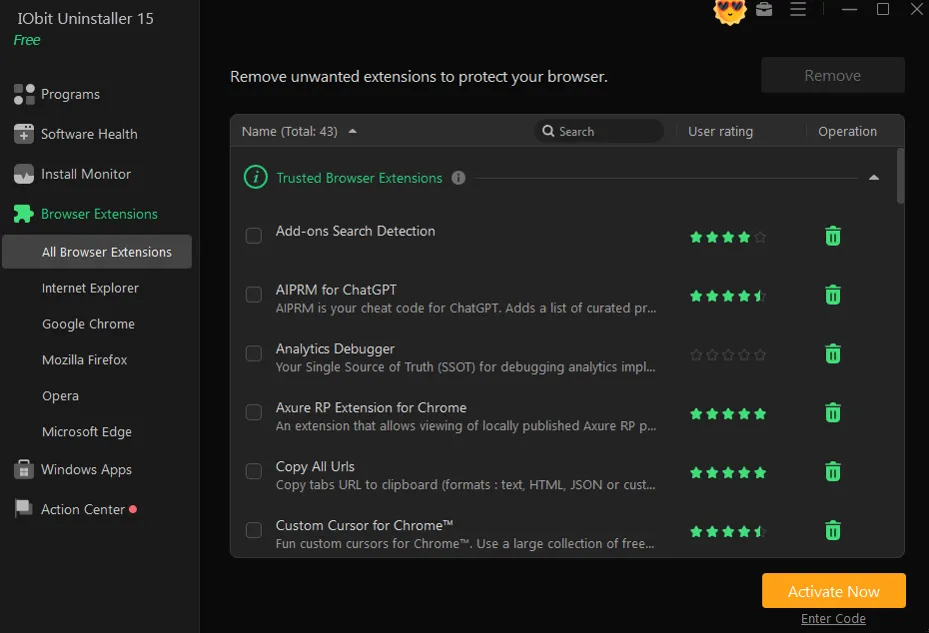
- Windows Apps: Pre-installed apps that come with Windows often resist manual uninstallation. IObit Uninstaller makes it possible to remove these stubborn apps safely, giving users complete control over their device’s software environment.
Utility Tools That Make a Difference
On top of its main uninstallation features, IObit Uninstaller 15 offers a range of utility tools that enhance user experience and overall PC health.
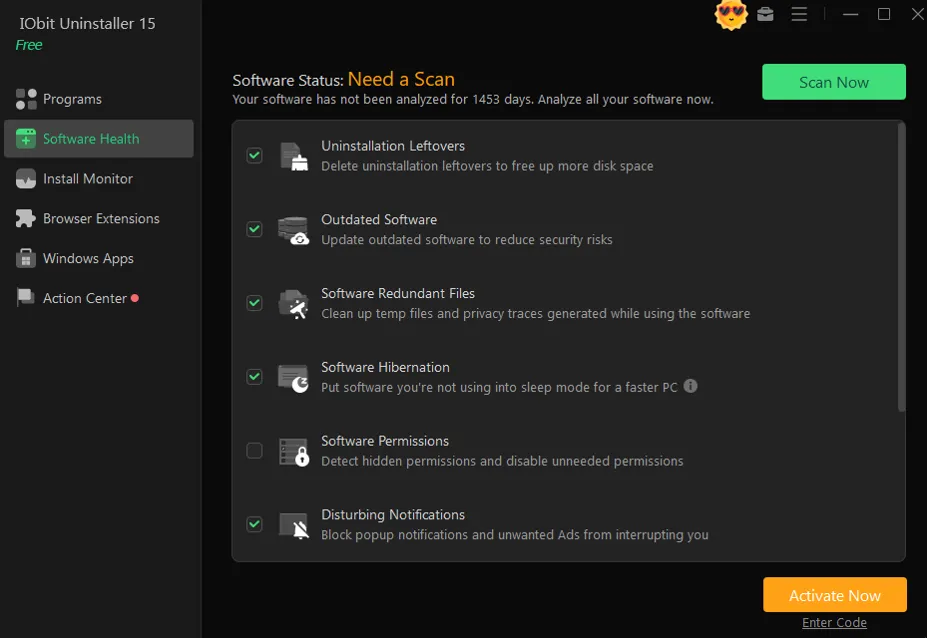
- Software Health: Scans the system for leftovers, outdated software, and malicious plug-ins, ensuring optimal performance.
- Easy Uninstall: Lets you drag and drop IObit’s icon onto any unwanted program window or desktop shortcut to initiate removal instantly.
- Force Uninstall: Perfect for stubborn or broken programs that can’t be removed by normal means.
- Install Monitor: Tracks installations in real time, recording all changes to ensure complete removal later.
- File Shredder: Permanently deletes sensitive files beyond recovery.
These tools turn IObit Uninstaller into an all-in-one maintenance suite that not only removes software but also keeps your computer running efficiently.
Is IObit Uninstaller Safe and Reliable?
Safety is a top concern for users downloading third-party utilities. Fortunately, IObit Uninstaller is completely safe and trusted by millions worldwide. It actively scans installation packages to detect unwanted or potentially harmful programs bundled with legitimate software.
The program ensures security through built-in restore point creation before uninstalling, allowing users to roll back changes if something goes wrong. Additionally, IObit regularly updates its malware and adware detection modules, keeping your system secure from harmful extensions or injected ads.
How It Compares to Alternatives
There are other uninstallers on the market — such as Ashampoo Uninstaller, Revo Uninstaller, GeekUninstaller, and CCleaner. While each has its merits, IObit Uninstaller 15 strikes the best balance between power and simplicity.
- Ashampoo and Revo provide deep scan features but are more complex for beginners.
- GeekUninstaller has a minimalist interface but lacks batch uninstallation capabilities.
- CCleaner once enjoyed popularity, but after past security concerns, many users turned to IObit as a safer, more transparent choice.
IObit Uninstaller continues to stand out because it combines a sleek interface with powerful performance — perfect for both casual and power users.
Free vs Pro: Which Version Should You Choose?
The Free version of IObit Uninstaller offers all the essential features — including complete uninstallation, leftover cleanup, and batch uninstall. For most home users, this version provides everything needed for routine maintenance.
The Pro version, however, adds automation and advanced tools such as:
- Enhanced deep scanning for leftover traces
- Real-time monitoring of installations
- Software health monitoring
- Automatic removal of residual files after batch uninstall
For users who frequently install and remove software or want fully automated cleanups, the upgrade to Pro is worth it.
Final Thoughts: Efficient Cleanup for Every User
Whether you’re looking to free up space, remove stubborn programs, or just keep your system organized, IObit Uninstaller 15 delivers an exceptional experience. Its Batch Uninstall feature turns what used to be a tedious task into a one-click operation, saving time and ensuring no residue remains.
While it doesn’t include a command-line silent uninstall for enterprise-level automation, its interactive, user-friendly design makes it ideal for personal and small-business users who want precision and control.
If you’re tired of incomplete uninstallations and lingering files, it’s time to take advantage of IObit’s smart cleanup capabilities. Download the free version of IObit Uninstaller today and experience how easy it is to keep your system light, fast, and fully optimized.

I’m Leo Knox, the wordplay wizard behind WordsTwists.com where I turn everyday meanings into funny, clever, and creative twists. If you’re tired of saying things the boring way, I’ve got a better (and funnier) one for you!